
On the Account Summary tab you can view your current account balance, view your tax bills for recent tax billings and see your property tax levy history displayed visually. If you are enrolled in monthly pre-authorized payments (PAP), you will also see your payment schedule.
My Tax Portal
Our online portal for property tax information allows you to:
- view current and previous bills
- view current property tax balance and payment history
- print a statement of account
- sign up for paperless billing (eBilling)
- enroll in the pre-authorized payment plan
- update your mailing address
To register for the online portal, you will require the following:
- the property address
- the property roll number
- the owner name exactly as it appears on the first line of the mailing address
- the unique Access Code shown on the top right corner of your tax bill
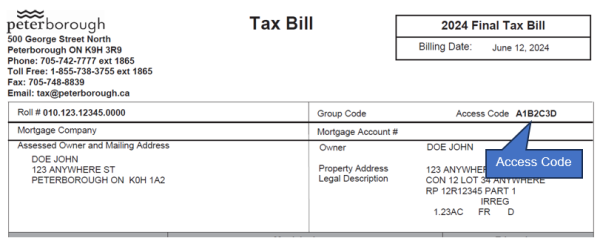
Sample tax bill showing Access Code location
Paperless Tax Billing
Sign up for paperless tax billing to access a digital copy of your tax bill through our secure property tax portal. Same tax bill, but you decide if you want to save it or print it.
Once you have registered for the portal, you can view, save and print a copy of your property tax bills. To enroll in paperless billing:
- Sign in to your account
- Click on Account Profile
- Under Account Options Links, click on "Register for eBilling"
- Follow the prompts to enter and confirm your email address
When the Interim and Final Tax Bills are posted to the portal, you will receive an email letting you know that your bill is available. To access your bill:
- Sign in to your account
- From the Account Summary or Transaction History tab, click on the PDF icon next to the installment transaction
- View, save or print your tax bill